Region Coverage
Jurisdiction-aware retrieval for desk officers working across regions, missions, and multilateral files - without moving any customer data.

How it works
Region focus narrows live search and corpus retrieval to the sources that matter for the jurisdiction or portfolio in front of the officer. It intersects with the composer's source toggles: selecting Europe keeps your toggles intact but restricts retrieval to the European allowlist. Global Affairs uses the full registry with no geographic narrowing.
Region focus is a retrieval setting, not a data boundary. Selecting a region never moves customer data. Workspace data residency remains EU-hosted regardless of which region an officer works in. The two controls are deliberately separate: one decides where retrieval looks, the other decides where data lives. The registry is organised into three groups of toggles. Defaults are tuned for serious institutional work: official corpora and foreign ministries on; press, OSINT, social, and broad web off until the officer opts in.
How jurisdiction controls work
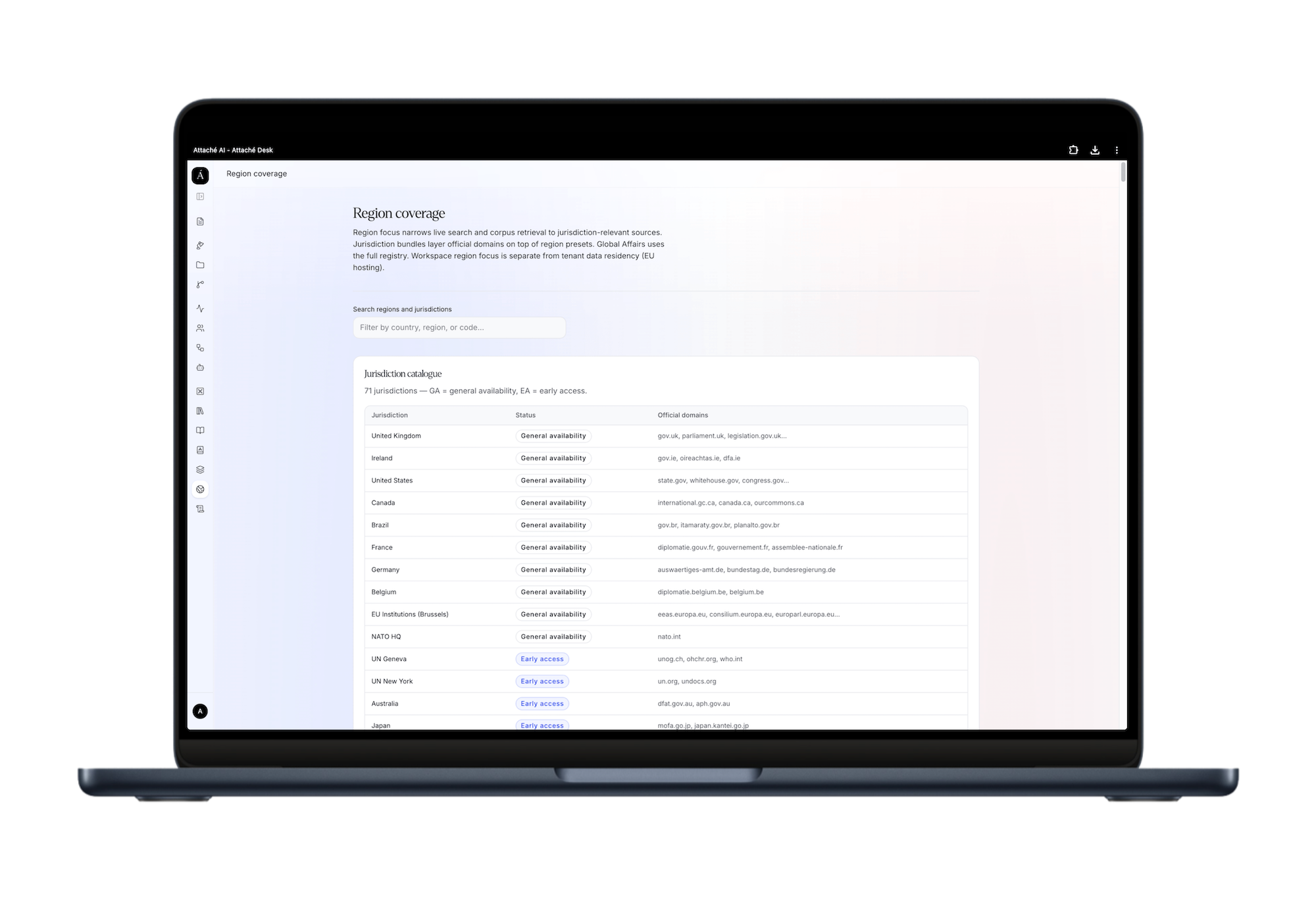
Jurisdiction catalogue. A searchable table of jurisdictions, each marked general availability or early access, with the official domains that anchor retrieval for that state. Filter by country, region, or code.
Jurisdiction bundles. Pre-built sets — selected from the workspace top bar — that layer country, institution, and regional-organisation domains on top of a region preset for a given file, biasing live search toward official and institutional sources for that jurisdiction set.
Country pin. An optional second control that prepends one government's official domains on top of the region preset. Use when drafting for a specific capital — bilateral talking points, a démarche, or a travel file to a single host government. Leave unpinned for multilateral or comparative work within the region.
Whitelisted domains. Each region exposes the exact domains it draws on, each shown with its citation tier, so the allowlist is auditable rather than opaque.
Region profiles
Global Affairs Full source registry — all corpora, foreign ministries, and optional intelligence tiers. No narrowing. Use for comparative work, multilateral research spanning multiple regions, or when the file spans jurisdictions.
Europe EU, OSCE, Council of Europe, NATO, and European MFA domains. Emphasises agreed EU and OSCE language. Default for bilateral desks within the OSCE area and EU missions.
United Kingdom (Early access) UK and Ireland ministries, FCDO and GOV.UK, Hansard and Parliament, UK Sanctions (OFSI), European context, and UK legislation via the Lex open API (Incubator for AI, Open Government Licence v3.0). Lex integration marked Early Access — verify against legislation.gov.uk for formal use.
North America US and Canada ministries (state.gov, Global Affairs Canada), UN, NATO, G7/G20 summit language.
Asia-Pacific Asia-Pacific foreign ministries and UN institutional sources.
Middle East MENA foreign ministries with emphasis on UN Security Council and humanitarian sources.
Africa African foreign ministries, UN, African Union–adjacent institutional references, and G7/G20.
Latin America Latin American foreign ministries and UN institutional sources.
Multilateral UN, OSCE, EU, NATO, Council of Europe, G7/G20, and treaty corpora only — institutional agreed language, no national MFA noise. Use when the drafting task is a multilateral text and national positions should not contaminate retrieval.
Step by step
01
Open the globe menu in the top bar. One control for region focus and optional country pin.
02
Select a region. This narrows live search corpora and the default ministry list to that geographic desk.
03
Optionally pin a country. This prioritises one government's official domains on top of the region preset - use when drafting for a specific capital.
04
Global Affairs keeps the full source registry; regional presets filter the country list to that area.
05
Changing region clears an active country pin. An incompatible pin is dropped automatically with a short notice in the top bar.
06
Institutional pins (EU, UN, NATO, and similar) appear automatically when they belong to the selected region.
07
Early-access jurisdictions are marked EA in the menu - coverage is expanding and the Official tier still applies.
08
Region focus is separate from tenant data residency (EU hosting). It only scopes retrieval, not where data is stored.

Worked example
United Kingdom
The UK profile illustrates how a jurisdiction is built up in practice.
Official tier: FCDO and GOV.UK (foreign-policy papers, ministerial statements, official guidance); Hansard and Parliament (debates, Prime Minister statements, committee evidence); UK Sanctions and OFSI (financial sanctions guidance and designation lists).
Analysis tier (held distinct): Chatham House, IISS, RUSI - UK policy analysis, explicitly labelled as not official government position.
Experimental integration: UK legislation semantic search via the Lex open API. Marked Early Access - verify against legislation.gov.uk for formal use. Lex operates under the Incubator for AI programme, Open Government Licence v3.0.
How it behaves in the composer
Region narrows retrieval; your source toggles still apply. The final source set is your toggles intersected with the region allowlist - if a toggle is off, that source is off regardless of region.
Jurisdiction bundles add precision for a single file without changing your account defaults. Swap back to Global Affairs or a different region at any time; the change takes effect on the next query.
Per-region defaults ship sensibly calibrated: Multilateral turns off national MFA domains; Europe emphasises EU, OSCE, and CoE; Middle East surfaces UNSC and humanitarian sources alongside MFA domains.
Frequently asked questions
Not sure where to start? Reach out with any questions, or if you're ready to dive right in, schedule a free consultation today.
-
No. Hosting stays in the EU regardless of region selection. Region only scopes where live retrieval looks.
-
Use Global Affairs for the full registry, or layer jurisdiction bundles to build a tailored multi-jurisdiction source set for a specific file.
-
The UK profile and the Lex integration are still maturing. We label them honestly until general availability rather than presenting incomplete coverage as complete.
-
The country pin clears when you pick a new region. If the saved pin is incompatible with the new region, Attaché drops it and shows a one-line notice under the top bar.
-
Pin a country when the turn depends on one capital's MFA sites, parliament, or national agencies — bilateral talking points, a démarche, or travel to a single host government. Leave unpinned for multilateral or comparative work within the region.